Subscribe and manage your subscription
Take out a plan in the app or on our website, find it again on another device, manage it or stop it.
One subscription covers all your devices. You can take it out on Android through Google Play, on iPhone through the App Store, or on our website, for the same price.
On Android
- Tap Settings, then Plan, and choose the plan.
- Enter your email address and type in the code you receive. Your subscription will be linked to this address, so it works on your other devices too.
- Choose a password for your account, or type in the one you already have.
- Pay with your Google account.
On iPhone
- Tap Settings, then Plan, and choose the plan.
- Pay with your Apple account: the plan is now active on your iPhone.
- To back up your notebook and have your plan on your other devices too, tap “Create my account…” or “I already have an account”. This is optional, and you can do it at any time.
On our website
Create your account with the “My Account” button at the top of this website, then choose the plan under “Subscription”. Then, on each device, sign in with your email address and password: see Find your notebook on another device.
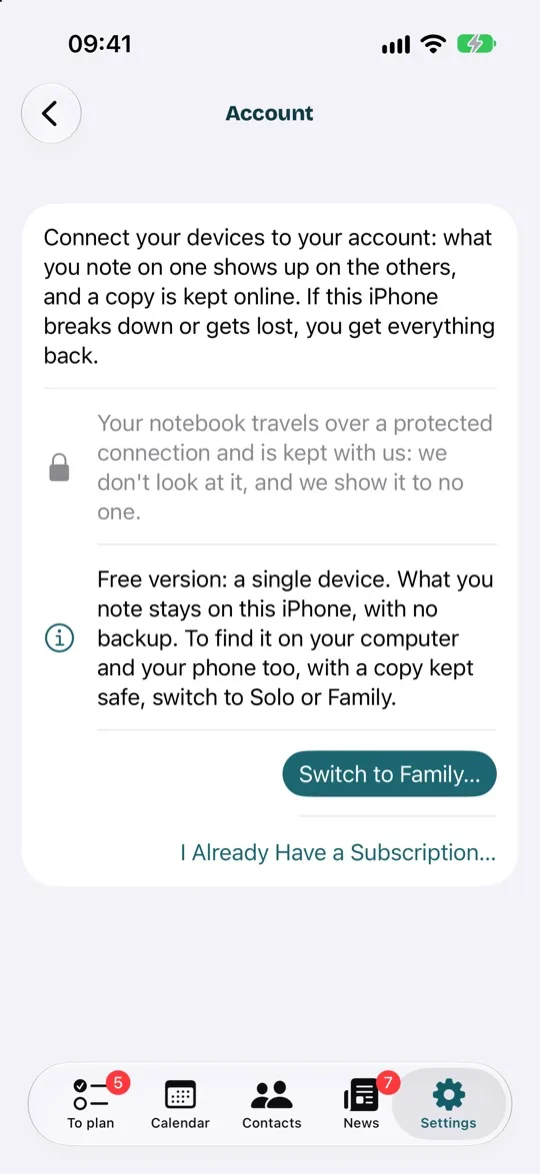
You already have a subscription
In Settings, Account, tap “I Already Have a Subscription…” and sign in with your account. If you took out your subscription with your Google or Apple account, you can also get it back by tapping “Restore Purchases” in Plan.
Manage or stop it
Plan shows where your subscription was taken out, and so where to manage it:
- on the App Store: in your iPhone's Settings, under Subscriptions;
- on Google Play: in the Google Play app, under Payments & subscriptions;
- on our website: in My Account, under “Subscription”.
If you stop your subscription, it carries on until the end of the year you've paid for. After that, nothing is erased: what you note down stays on your devices, and the copy of your notebook is kept for 12 months.